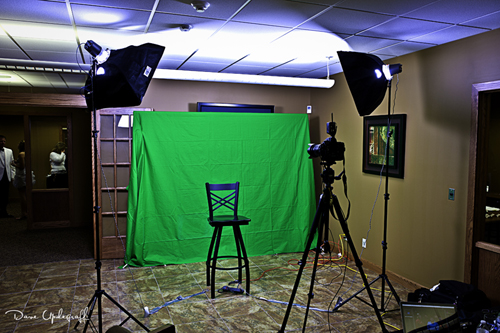
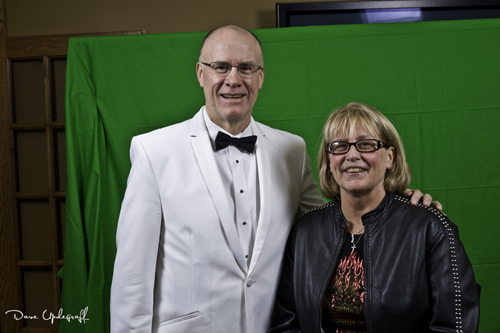
Happy Monday. Today I thought I would talk about my love / hate relationship with green screen photography. This was my set up last Thursday evening as I did portraits for the attendees of the Ladies’ Night Gala. This year I invested in a larger green screen because of last year’s problems with trying to take group shots. This screen is 9 feet by 16 feet. Of course I only have enough light stands to go 10 feet wide and about 6 feet high.
If you look at the floor in front of the green screen you will see the “green blow back.” The is the green color being reflected back to the subject. Two ways of mitigating that is to properly light your background and or moving your subjects far enough in front of the green screen to negate it.
Since I only have two lights I opt for the moving the subjects far enough away from the green screen to negate the blow back. Most of the time it works pretty well.
The two lights I have are really inexpensive beginner strobe lights. They do not have variable intensity controls so it is hard to control the amount of light they put out and are only 100 watt lights. Since I do not do a lot of portrait work (right now anyway) they do get the job done. I also use two 24 inch X 24 inch soft boxes attached to the lights to soften the light and diffuse it.

Now to my love / hate relationship with green screen photography. Some of which I have to blame on my lack of skill. These two lovely folks are my good friends Gary and Lynn Saelens. You can see one of the problems is that Gary is just a tad bit taller than my screen. Additionally because of their height difference I couldn’t get them both in the frame with my D3, which had the 70 – 200 portrait lens on it and it was on the tripod (additionally it was tethered to my laptop so I couldn’t move it.) I had to use my D700 with the 24 – 70 lens. Then the angel I had to shoot from showed bare walls not covered by the green screen.
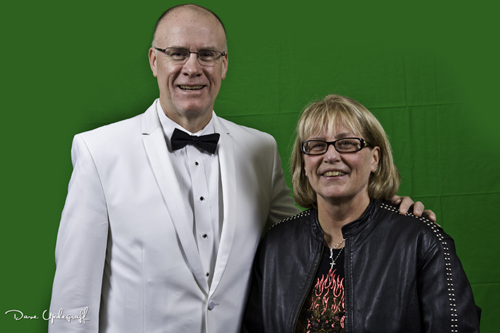
So to compensate for the problems I had to extend (in Photoshop) the green screen and then crop the image. (I didn’t do a very good job on the crop by the way.) I should have left more space at the top of Gary’s head. This image however was just for this discussion so I didn’t take time to fix it.
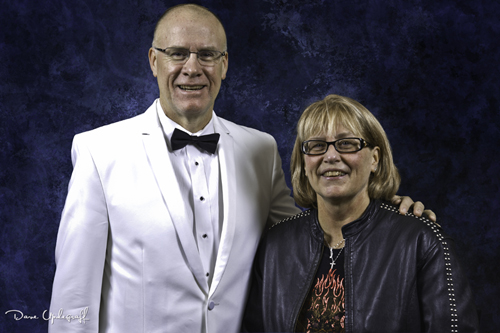
Finally after the image looks the way I want it to I take it over to a “Chroma Key” program called FXhome PhotoKey 4 to digitally remove the green screen or to “Key” the green screen out of the image.
I like the excellent job PhotoKey does in removing the green screen but I do not like the fact that it “mutes” the color of the subjects and requires that I go back into Photoshop and readjust those skin tones (which are very hard for me to get correct.)
The obvious question is then why use green screen? Versatility is the main reason. I can put any kind of background in the image I choose. From a cloth back drop to a winter scene or a tropic beach scene. But like so many things in life, that versatility comes with a price.
Anyway I have lots of green screen images from the event that I need to process and it will take some time so I had better get after it. Enjoy your Monday. Thanks for stopping by and be careful.







 Upde Designs